
5.1. Distributor: View Warranties Registered by Installation Shops
This guide explains how distributors can view warranties registered by installation shops for STEK products. It provides step-by-step instructions on accessing and navigating the warranty information, including active, pending, and expired warranties.
Click "Registered Products" under Warranties.

Click "Active" to see the warranties that the installation shops have registered and the car owners have activated.

Click "Pending" to see the warranties that the installation shops have registered but the car owners have not yet activated.

Click "Expired" to see the expired warranties.

To see the warranty details, click this icon.
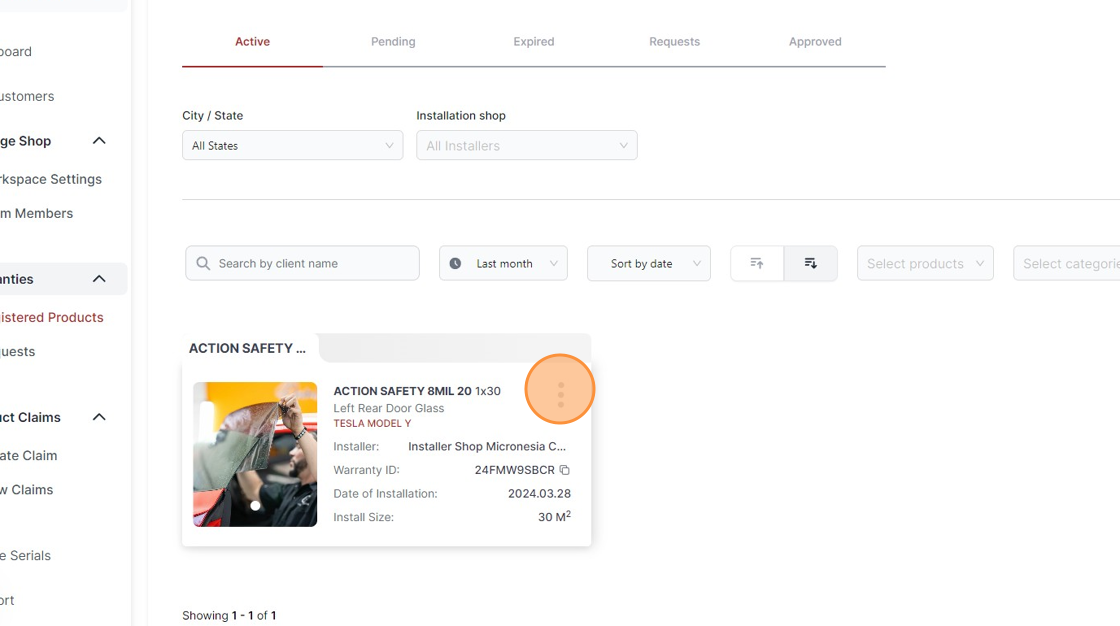
Click "See Details"

Click "Download PDF" to download the warranty.

Was this article helpful?
That’s Great!
Thank you for your feedback
Sorry! We couldn't be helpful
Thank you for your feedback
Feedback sent
We appreciate your effort and will try to fix the article