
5.2. Distributor: Approve Changes to a Warranty by an Installation Shop
This guide provides step-by-step instructions on how to approve changes to a warranty made by an Installation Shop. By following these steps, distributors can ensure that warranty registrations are only accepted for genuine products and installations.
Click "Requests" under Warranties.

Warranties with a "Pending" status are those that the installer has modified and require Distributor approval.

Click on the warranty with a "Pending" status to view the details and action buttons.

You can see what exactly has been modified in the warranty.
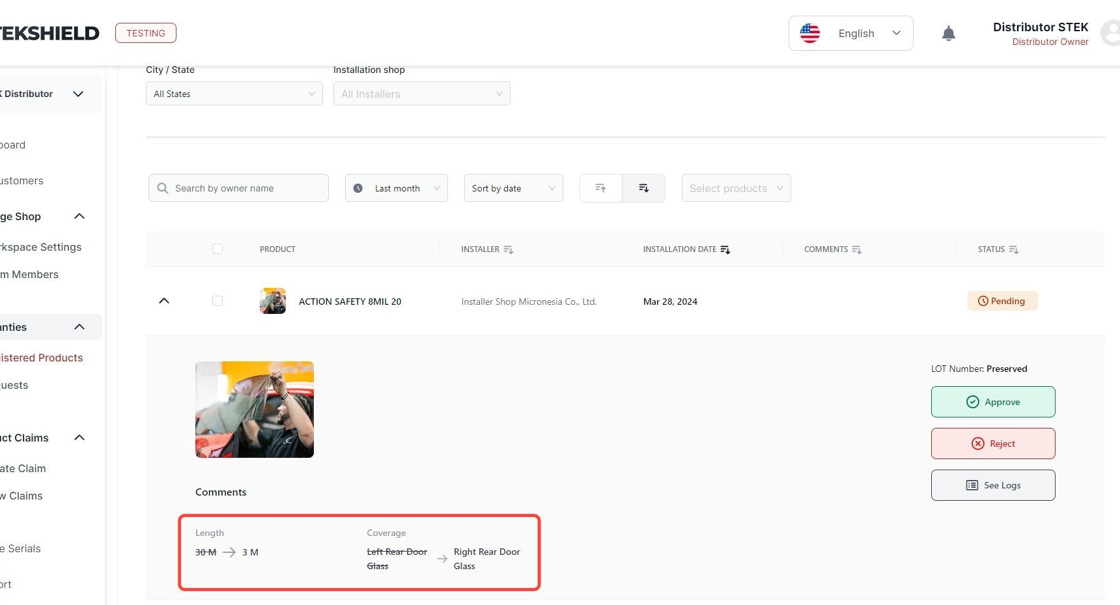
If you do not accept the modification, click "Reject".

If you decide to reject, provide the reason for rejection to the Installation Shop.

If you accept the modification, click "Approve".

After you approve the modified warranty, it will move to the "Approved" tab.

It will also be displayed in the "Active" tab, reflecting the latest modifications.

Was this article helpful?
That’s Great!
Thank you for your feedback
Sorry! We couldn't be helpful
Thank you for your feedback
Feedback sent
We appreciate your effort and will try to fix the article